Introducing the Ditto Fire OS Receiver
The new Ditto Fire OS Receiver brings wireless screen mirroring, digital signage and emergency alerts to Fire OS devices. It joins Windows, Apple TV...

1 min read
It’s time to press play on a new Ditto feature. We're excited to introduce YouTube streaming in Ditto. It offers a smoother, more powerful way to share video content during lessons, meetings and presentations.
With this update, you can now stream YouTube videos directly from your devices to any Ditto-enabled display. No screen mirroring required.
Get started with Ditto. Create your account here.
YouTube streaming in Ditto delivers improved video playback performance:
Less lag
Better audio sync
Seamless playback from start to finish
From the classroom to the conference room, video sharing with Ditto is better than ever.
Until now, the only way to share YouTube videos with Ditto was by mirroring your screen. That worked well, but streaming unlocks a whole new level of video playback. The result is a better viewing experience for everyone.
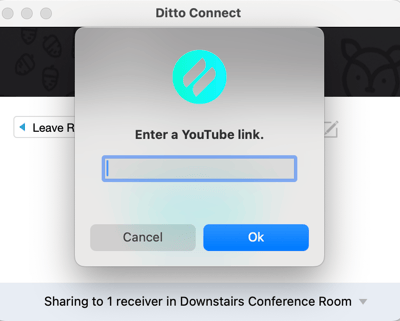
Plus, streaming frees up your device for other tasks while videos are playing. Take notes, manage slides or reference materials without interrupting the video stream.
Use built-in playback controls to keep audiences engaged and presentations on track.
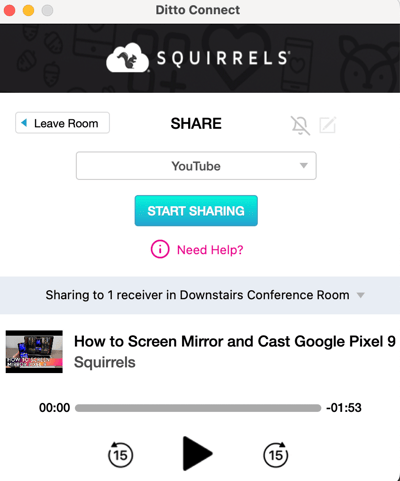
Pause a video stream when it’s time for discussion
Skip forward to move ahead quickly
Jump backward to revisit important moments
Don’t worry about searching YouTube every time you want to stream a video. Ditto keeps a list of the YouTube videos you recently streamed via Ditto so you can quickly share them again. It’s perfect for educators who show the same video in multiple classes, presenters who repeat presentations or anyone who wants to save time.
YouTube streaming is available in the Ditto Connect app on Mac and Windows devices.
To get started, update the following Ditto apps to the latest version:
Ditto Connect for Mac
Ditto Connect for Windows
Ditto tvOS Receiver app
Ditto Windows Receiver app
Update in the apps or download the latest versions here.
Get step-by-step instructions for Ditto YouTube video streaming here.
Don’t forget: Subscribe to our blog so you never miss an update.

The new Ditto Fire OS Receiver brings wireless screen mirroring, digital signage and emergency alerts to Fire OS devices. It joins Windows, Apple TV...

Ditto now runs on Android-powered displays. The new Ditto Android Receiver gives schools and businesses another way to bring wireless screen...

Windows still can't receive AirPlay connections on its own. Try to open Screen Mirroring on an iPhone in a room full of PCs. The list comes back...
This Ditto update improves the quality of motion sensitive items like videos and video games when mirrored to Ditto receivers.
This Ditto Connect for Android update improves the mirroring quality of motion-sensitive items like videos and video games.
The new Ditto Windows Receiver improves video mirroring performance, brings cleaner layouts for mirrored devices, streamlines app menu navigation and...

Mirror any device to your screen — wirelessly.
One universal license for each app — works on macOS and Windows.
— or buy Reflector 4 on its own —



For schools, districts or volume licensing — contact us.

Stream audio and video from your Mac or PC to any screen.
One universal license for each app — works on macOS and Windows.
— or buy AirParrot 3 on its own —
For schools, districts or volume licensing — contact us.