Introducing the Ditto Fire OS Receiver
The new Ditto Fire OS Receiver brings wireless screen mirroring, digital signage and emergency alerts to Fire OS devices. It joins Windows, Apple TV...

1 min read
A new Ditto Account Portal update introduces digital signage quadrants and the ability to schedule on-screen alerts.
Explore what's new in the latest Ditto release.
An exciting new digital signage layout has arrived. The media quadrants layout allows you to display four different image and video files on your digital signs at the same time. Mix and match content types as needed – PNG, JPEG, JPG and MP4.
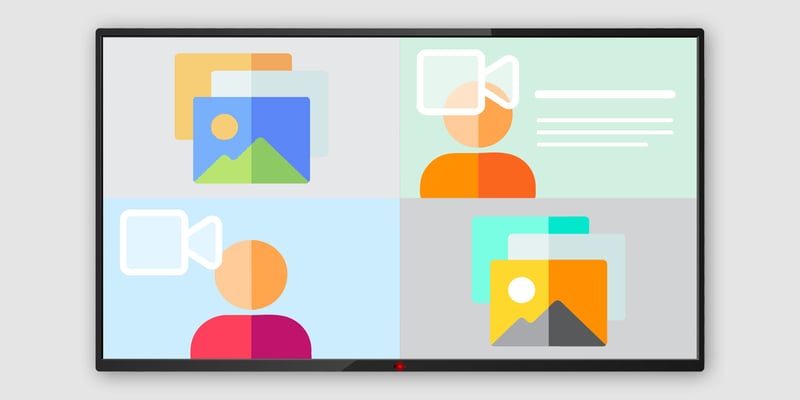
The media files display in four distinct boxes on your digital signs. This new layout type is helpful when you need to show multiple pieces of content together on the screen without transitioning between signage items. Previously, users had to create a signage item for each new media file they wanted to display.
The media quadrants layout gives organizations a more flexible digital signage experience. Access it now in the Ditto Account Portal. Click Signage > create or select a signage list > click the Signage Items tab > New Item > Media Quadrants
Organizations now have the ability to schedule on-screen alerts for a future date and time. This makes it easier to prepare in advance for known events like fire drills and routine maintenance.
Visit our Knowledge Base if you have questions.
Don’t forget: Subscribe to our blog so you never miss an update.

The new Ditto Fire OS Receiver brings wireless screen mirroring, digital signage and emergency alerts to Fire OS devices. It joins Windows, Apple TV...

Ditto now runs on Android-powered displays. The new Ditto Android Receiver gives schools and businesses another way to bring wireless screen...

Windows still can't receive AirPlay connections on its own. Try to open Screen Mirroring on an iPhone in a room full of PCs. The list comes back...
This new Ditto update contains better access to support within Ditto Connect, the ability to dim receiver screens, new digital signage templates and...
This Ditto update brings a way to manage and moderate Ditto screen mirroring. The Ditto Director application is now available for free on the App...
This new Ditto update improves the account portal mobile UI, resolves signage preview issues in the digital signage editor and updates the deployment...

Mirror any device to your screen — wirelessly.
One universal license for each app — works on macOS and Windows.
— or buy Reflector 4 on its own —



For schools, districts or volume licensing — contact us.

Stream audio and video from your Mac or PC to any screen.
One universal license for each app — works on macOS and Windows.
— or buy AirParrot 3 on its own —
For schools, districts or volume licensing — contact us.