Introducing the Ditto Fire OS Receiver
The new Ditto Fire OS Receiver brings wireless screen mirroring, digital signage and emergency alerts to Fire OS devices. It joins Windows, Apple TV...

1 min read

Digital signage management just got easier with Ditto. This account portal update improves how Ditto admins manage and deploy digital signage for their organization.
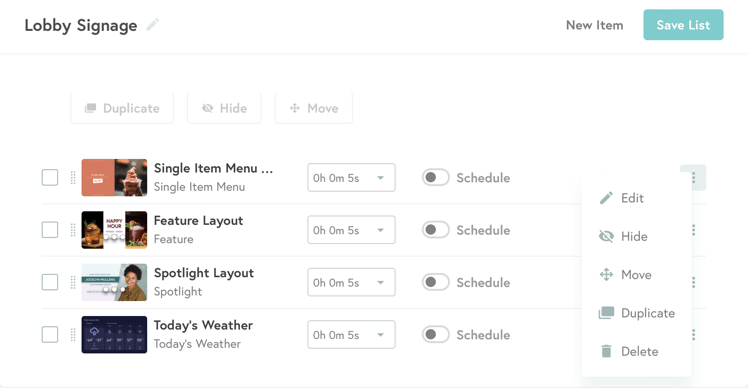
The latest enhancements come to digital signage lists and items. Admins can now duplicate existing signage items (like signage templates and uploaded media) and move items between lists. Previously, there was no way to add the same item to multiple lists; Admins had to recreate or re-upload the item each time they wanted to add it to a list. The ability to duplicate and move items makes digital signage management easier and more scalable.
The update also gives Ditto admins the ability to hide signage items without permanently removing them from lists.
The new management features, along with the resulting scalability and time-management benefits, are ideal for organizations with many signage assets deployed to numerous screens.
See a detailed breakdown of this release:
Duplicate signage
Signage items can be duplicated within a list. Once duplicated, the copy will appear at the bottom of the list. Signage items can be duplicated as many times as necessary. Both the original and duplicates are editable. Any edits made to an item after duplication will only be applied to that version of the item, not the original.
Move signage
Users can quickly move signage items to different lists. When an item is moved, it is removed from the previous list and will appear at the bottom of the new list. Users can rearrange the items in the list as desired. If you want an item in multiple lists, simply make as many duplicates as you need and move the duplicates to your desired lists.
Hide signage
Signage items can be hidden within a list. This allows users to stop a signage item from displaying but does not delete the item from the list. Signage items can be hidden and unhidden with ease.
Note: All three of the capabilities listed above can be done in bulk.
Here's a snapshot of what’s new in Ditto:
Visit our Knowledge Base if you have questions.
Don’t forget: Subscribe to our blog so you never miss an update.

The new Ditto Fire OS Receiver brings wireless screen mirroring, digital signage and emergency alerts to Fire OS devices. It joins Windows, Apple TV...

Ditto now runs on Android-powered displays. The new Ditto Android Receiver gives schools and businesses another way to bring wireless screen...

Windows still can't receive AirPlay connections on its own. Try to open Screen Mirroring on an iPhone in a room full of PCs. The list comes back...

This Ditto Account Portal update expands digital signage management functionality and provides a warning alert when leaving a page with unsaved...

A new Ditto Account Portal update introduces digital signage quadrants and the ability to schedule on-screen alerts.
Introducing static web URLs to Ditto digital signage. Display intranets, internal charts, graphs, websites and more with the latest signage template.

Mirror any device to your screen — wirelessly.
One universal license for each app — works on macOS and Windows.
— or buy Reflector 4 on its own —



For schools, districts or volume licensing — contact us.

Stream audio and video from your Mac or PC to any screen.
One universal license for each app — works on macOS and Windows.
— or buy AirParrot 3 on its own —
For schools, districts or volume licensing — contact us.