Introducing the Ditto Fire OS Receiver
The new Ditto Fire OS Receiver brings wireless screen mirroring, digital signage and emergency alerts to Fire OS devices. It joins Windows, Apple TV...

1 min read
Educators no longer need to peer over a student’s shoulder to monitor progress or gauge how the student is progressing through a task. In fact, they don’t even have to leave their desks.
While students are busy using their devices to work on an assignment, complete group work or take a test, teachers can use device management software called ClassHub to see what is happening on every student device in real time.
The ClassHub Screen Peek feature allows teachers to see student devices from their computer to ensure students are on task and using devices in the classroom as directed.
Once a teacher starts a class in the ClassHub Classroom Manager, each student in the classroom is listed along with a student avatar. Selecting the Screen Peek View option in the Classroom Manager presents a live view of every student device in the classroom. The teacher can see what each student is working on (or not working on) and how each student is performing in a matter of seconds.
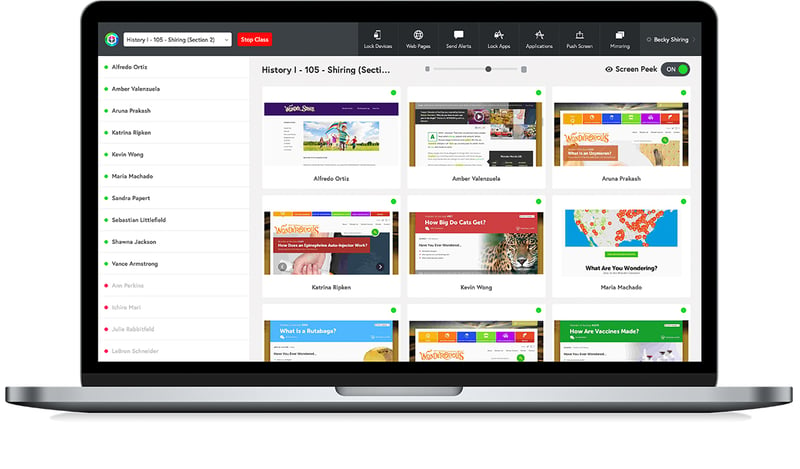 To access a larger view of a specific student’s device, teachers simply click on the device in the Classroom Manager. The enlarged view also presents several device management actions, including the ability to:
Does ClassHub sound like something you’ve been wishing for since the day devices appeared in the classroom? We’re happy to help bring it to your school or district.
 today to chat about ClassHub or schedule a demo.

The new Ditto Fire OS Receiver brings wireless screen mirroring, digital signage and emergency alerts to Fire OS devices. It joins Windows, Apple TV...

Ditto now runs on Android-powered displays. The new Ditto Android Receiver gives schools and businesses another way to bring wireless screen...

Windows still can't receive AirPlay connections on its own. Try to open Screen Mirroring on an iPhone in a room full of PCs. The list comes back...
Using technology to get students moving is easy. Here's how one educator found a cost-effective way to energize his students. Plus, learn how you can...
This update to Reflector Student includes a new UI, Dark Mode support, bug fixes and performance improvements.
Educators and students shouldn’t need an AV survival guide. Simplify wireless screen sharing and deliver the experience they expect. Here's how.

Mirror any device to your screen — wirelessly.
One universal license for each app — works on macOS and Windows.
— or buy Reflector 4 on its own —



For schools, districts or volume licensing — contact us.

Stream audio and video from your Mac or PC to any screen.
One universal license for each app — works on macOS and Windows.
— or buy AirParrot 3 on its own —
For schools, districts or volume licensing — contact us.