Introducing the Ditto Fire OS Receiver
The new Ditto Fire OS Receiver brings wireless screen mirroring, digital signage and emergency alerts to Fire OS devices. It joins Windows, Apple TV...

2 min read
We recently asked our Reflector Twitter followers which mobile device is most often used in their classrooms. The choices included iPads, Chromebooks and Surface Pros.
Not surprisingly, iPads and Chromebooks outpaced Surface Pros. Here’s how the results broke down:
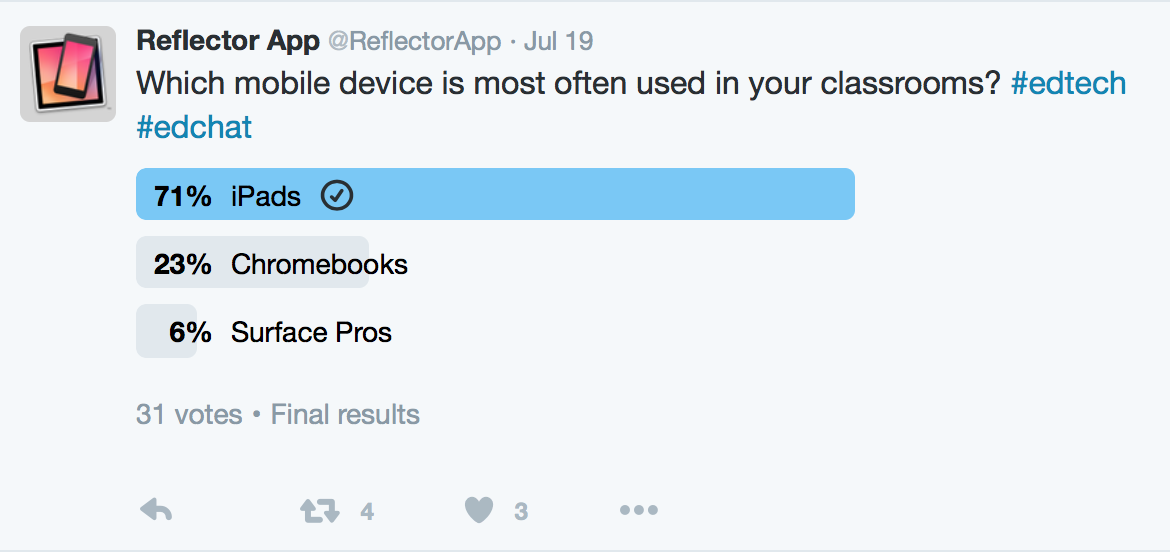
Microsoft Surface Pros might not dominate classrooms like iPads and Chromebooks, but they are an incredibly valuable tool for students and teachers who use them daily. That’s why we made sure our latest screen-sharing service, Ditto, is compatible with Surface Pros.
How can a student or teacher present what’s happening on their Surface Pro screen to the entire class? Traditionally, the class would have to huddle around a desk to get a glimpse of the screen. If you wanted to wirelessly share that Surface Pro screen to a TV or external display, you were out of luck.
Introducing the Ditto screen-sharing service for 1:1 Surface Pro classrooms
Ditto brings wireless screen-sharing capabilities to each and every Surface Pro in classrooms that contain one of the following three AirPlay or Cast receivers:
How does Ditto work?
It’s simple. In order to wirelessly share a Surface Pro screen to one of the three receivers listed above, a user must simply go to connect.goditto.com and enter the classroom’s unique Ditto code.
How does my classroom get a Ditto code?
To get a Ditto code for your classroom, you must first sign up for Ditto and register the Apple TV, Chromecast or Reflector-enabled device in your classroom! Registering a classroom is simple. You (or your school’s tech integrationist) can do that at www.goditto.com.
After registering the AirPlay/Cast receiver (Apple TV, Chromecast or Reflector 2), your classroom will be assigned a unique code.
Once a room has a Ditto subscription, an unlimited number of teachers, students and faculty can use that subscription because Ditto is priced per room rather than per individual. So you don’t have to worry about managing, updating and, most importantly, paying for individual student licenses for every Surface Pro.
How does Ditto know which receiver to send to?
Does your school have multiple Apple TVs, Chromecasts or Reflector-enabled devices? We’re assuming it does, and that’s not a problem. Ditto knows which Apple TV or Chromecast to connect the Surface Pro to the moment a teacher or student enters the room’s Ditto code at connect.goditto.com. So you don’t have to scroll through an endless list of AirPlay/Cast receivers and determine which one to select. Ditto does it for you.
Do I have to share my entire Surface Pro screen?
Upon connection, Ditto asks whether you want to share your entire Surface Pro display or a single window/app. This helps remove distractions and ensures that others in the class don’t see anything they shouldn’t.

Go Ditto
Ditto is the newest, most practical way to bring collaboration and sharing to Surface Pro classrooms. Visit www.goditto.com to register today! As always, feel free to leave us a comment below.

The new Ditto Fire OS Receiver brings wireless screen mirroring, digital signage and emergency alerts to Fire OS devices. It joins Windows, Apple TV...

Ditto now runs on Android-powered displays. The new Ditto Android Receiver gives schools and businesses another way to bring wireless screen...

Windows still can't receive AirPlay connections on its own. Try to open Screen Mirroring on an iPhone in a room full of PCs. The list comes back...
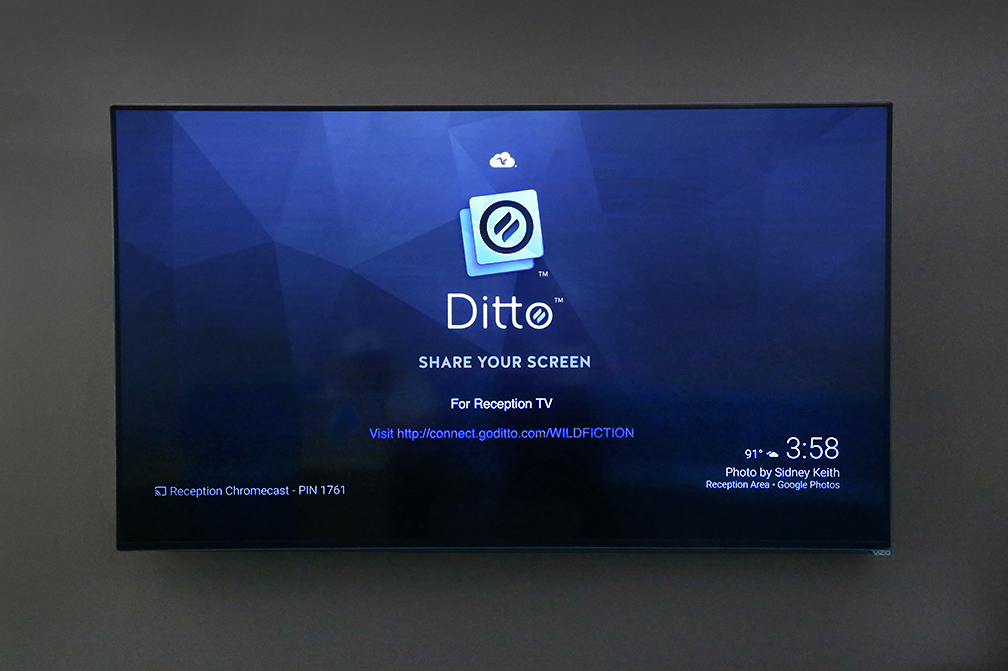
How to Configure a Chromecast Background to Display Ditto Connection Details

A Workplace Screen-Sharing Solution For Small Business

Discover how using Kandji MDM with Squirrels screen mirroring and digital signage software delivers cost efficiencies, security and seamless...

Mirror any device to your screen — wirelessly.
One universal license for each app — works on macOS and Windows.
— or buy Reflector 4 on its own —



For schools, districts or volume licensing — contact us.

Stream audio and video from your Mac or PC to any screen.
One universal license for each app — works on macOS and Windows.
— or buy AirParrot 3 on its own —
For schools, districts or volume licensing — contact us.